

Product updates and release notes for Wicked CMS
Manage Webflow pages alongside CMS and Assets
Browse pages and update their metadata, SEO text, and Open Graph text from Wicked CMS.
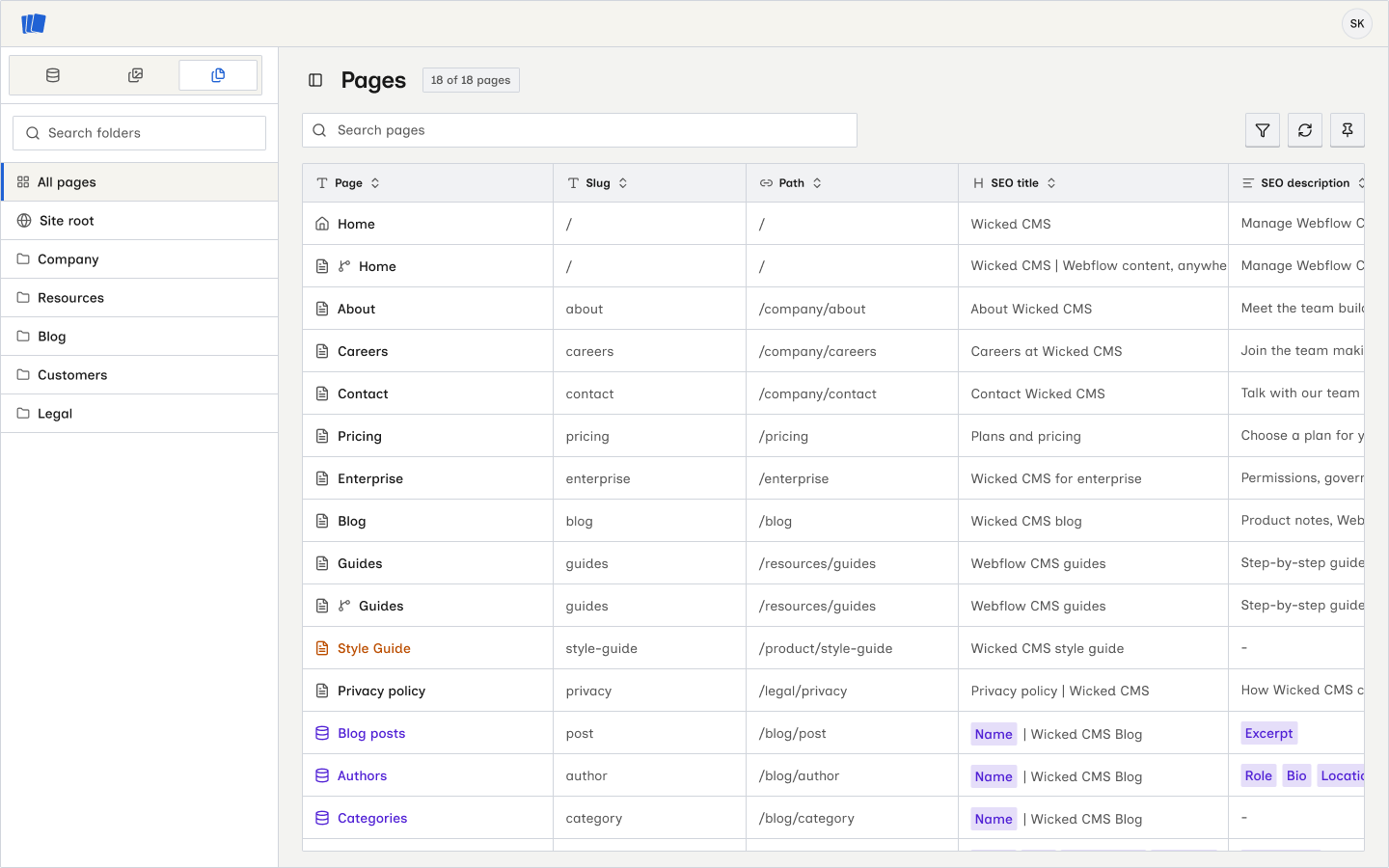
What’s new?
- CMS, Pages, and Assets switcher in the site sidebar. Move between collection items, pages, and the asset library.
- Folder sidebar with All pages, Site root, Webflow folders, and folder search.
- Pages table with page type, path, SEO, Open Graph, and last updated data.
- Search page names, slugs, paths, and SEO titles. Filter by metadata, page type, or draft status.
- Choose, reorder, and sort table columns, then use Reload pages to fetch current data from Webflow.
- Page detail sheet to edit a static page’s title, slug, SEO title, SEO description, Open Graph title, and Open Graph description.
- Search result and Open Graph previews that update as you edit.
- CMS template formulas for SEO and Open Graph text, with previews based on collection items.
How to open Pages
Editing requires the Edit Page data permission. If the fields are read-only, reauthorize Webflow. See Browse and find pages and Edit page settings for details.